New Business
Phone: 415.227.1140
Fax: 415.227.1148
Email
Office
609 Mission Street, 2nd Floor
San Francisco, CA 94105
Get directions to our office
* indicates required field
Required fields must be filled in!

Company

GIS & Geospatial Blog

Farallon staff's thoughts on GIS & geospatial trends, location technologies and applications

Integrating GIS with the semantic web for cultural heritage

Posted on April 24, 2013 by Farallon Geographics Team

Integrating GIS with the semantic web for cultural heritage

The SemanticWeb.com has published The Arches Project Puts A Semantic And Geo-Spatial Spin On Cultural Heritage which describes how the Arches project, a collaboration between the Getty Conservation Institute, World Monuments Fund and Farallon Geographics delivers a semantic geospatial solution for cultural heritage management.

Arches grew out of earlier work to develop MEGA-Jordan, a purpose-built GIS to inventory and manage archaeology sites at a national level for that country. Arches was designed to be more flexible, able to accommodate any country or immovable cultural heritage institution. It was also designed to be more than a GIS and inventory management system.

The Semantic Web for Cultural Heritage

Currently, many archives, libraries, museums, and other cultural heritage institutions make use of the CIDOC Conceptual Reference Model, an information standard that provides a common and extensible semantic framework describing collections and related business entities. The CIDOC CRM defines a common language and conceptual framework for domain experts and implementers. The use of a semantic framework greatly enhances accessibility to cultural heritage information, speeds integration of multiple databases and improves sharing between organizations. Importantly it also works with existing relational databases and aligns with web services.

Arches was designed to integrate the CIDOC CRM. Whereas GIS defines where something is, the CIDOC CRM represents the "who, what and when" in a machine readable form. (Machine readable is key here, because it means that the data definition must provide meaning and context so that a computer can understand the information rather than require a human to interpret it.)

In a semantic data model an entity type might be a heritage artifact, which provides an elementary category that can be easily understood. In a relational model, in contrast, you might end up with a number of different tables such as materials and techniques, designations, descriptions, etc. Each of these things represents part of what makes up the artifact, but with a semantic data model the artifact is the whole entity and its relationships rather than breaking it down into parts.

Integrating GIS with a semantic framework for cultural heritage

By integrating GIS with the semantic framework for cultural heritage, Arches breaks new ground and enables the system to make connections between cultural heritage objects that might otherwise go unobserved. Since the solution is extensible, it also means the system can continually evolve.

From the SematicWeb.com article:
"We realized early on that to do this right, we weren't going to be able to do it by defining a bunch of traditional database tables and filling them up with data," says CEO Dennis Wuthrich. "We needed to think about building an app on the ontology that let people define the kinds of things they wanted to track and the relationships between the attributes of things." With the help of the English Heritage and the Flanders Heritage Agency, which were familiar with the ontology and had the domain expertise, Farallon developed a graph database that represents the relationship of a site to its name, period, location, actors, activities, architectural heritage, and so on. It's now building the forms necessary for persons to create and manage that information.

So, if you have a building, for example, there is a semantically defined way of associating a name or set of names with it, and a semantically meaningful way of associating a suite of materials the building might be made up from, its cultural periods, its location and the various ways you can define it (geospatially or relative to its address or an administrative area). "Basically, you have a system that knows how to track these semantic relationships and how to map between something like a physical feature in the field and the data elements defined as the necessary suite of information to manage these cultural artifacts.

Tags:   Asset Management,   Cultural Resources

Using MS Access as the query interface to Oracle Spatial

Posted on March 13, 2013 by Adam Lodge

Like many people, I cut my teeth in the database world using MS Access.  And, early in my career, I was much more comfortable writing queries using Access’s sql GUI than I was writing sql in a command prompt.  As such, it was common practice for me to make ODBC links to my Oracle Spatial database, and use Access as the interface to do the actual querying. 

In the case of Oracle Spatial though, there was one problem - when I tried to link to a table that had a column of sdo_geometry data type, I got this error:

Invalid field definition ‘GEOMETRY’ in definition of index or relationship

The solution?… you’re gonna laugh.  Make a view in Oracle that excludes the geometry column and connect to that instead of the base table.

Tags:   Database

Arches Geospatial Asset Management System Tailored to Cultural Heritage Goes Live for Early Access

Posted on January 30, 2013 by Joe Metro

Arches Geospatial Asset Management System Tailored to Cultural Heritage Goes Live for Early Access

I'm pleased to announce that the cultural heritage project Farallon has been helping the Getty Conservation Institute and World Monuments Fund to build is now live for early access!

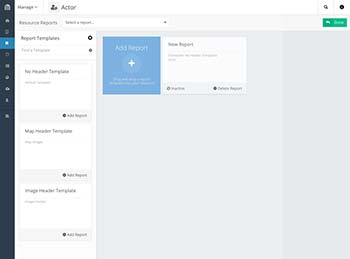
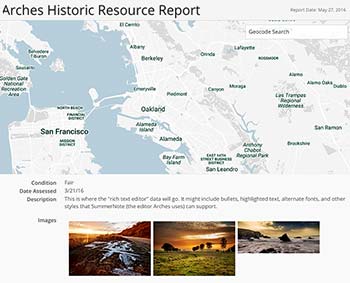
Arches is an open source, geospatial asset management system specifically tailored to the needs of the international cultural heritage field. It can inventory and document all types of immovable heritage, including buildings and other structures, cultural landscapes, heritage ensembles or districts, as well as archaeological sites.

Update Feb 25, 2013: Directions Magazine has published an article about Arches and its uses as both a technical and business solution.

We designed arches to effectively address the following cultural heritage requirements:

  • Identification and inventory
  • Research and analysis
  • Monitoring and risk mapping
  • Determining needs and priorities for investigation, research, conservation and management
  • Planning for investigation, conservation, and management activities
  • Raising awareness and promoting understanding among the public, as well as governmental authorities and decision makers

Arches is an evolution of our earlier work designing and developing MEGA and shares many of the same fundamental strengths including being: open source, standards-based, adaptable, multi-lingual and user-friendly for desktop, web and mobile workflows.

Below is the announcement:


Dear Friends and Colleagues,

The Getty Conservation Institute and World Monuments Fund are excited to tell you about a new, open source software application that we are developing for the heritage field. It is called Arches.

Arches is an open source geospatial information system that will be purpose-built to help heritage organizations inventory and manage all types of immovable cultural heritage. Arches is being developed to address the widespread need for low-cost electronic inventories that are easy to use and access. This collaborative effort combines state-of-the-art software development with the insights of heritage professionals from around the world.

You can find more information about Arches at http://archesproject.org.

Today, we are making available an early version of the Arches software code. Information technology specialists may download this version from https://bitbucket.org/arches/arches. We welcome you to assess it, and we hope to receive your feedback.

In June 2013, we will release a more advanced version of Arches that will be ready for heritage organizations to download, evaluate, customize, and deploy.

We encourage you to find out more about Arches, to let others know about it, and to consider more ways in which you can assist this effort.

Tags:   Asset Management,   Cultural Resources,   Open Source

GIS and Mapping as a Workflow Management Solution for Utility Infrastructure

Posted on January 14, 2013 by Joe Metro

GIS and Mapping as a Workflow Management Solution for Utility Infrastructure

One way to picture the infrastructure of almost any utility - electricity, oil, natural gas, telecommunications, etc. - is to visualize an interconnected network of different piping systems and associated components.

In the case of a water and sewage treatment facility, for example, there’s the Backwash In piping system that has a particular type of pipe and a particular type of valve. There’s the Raw Water In system with its own combination of pipes and values; the Return Activated Sludge system with its own pipes and valves; the Filter By-Pass system with yet another kind of pipe-valve combination. Etc. etc.

A small to mid-scale treatment facility can easily have 30 or more different piping systems, and over 200 layers of associated system components.

Visualizing Complex Infrastructure Assets & Processes

Tracking, visualizing, managing and communicating all of these different layers of piping, associated infrastructure assets (valves, filters, fittings, communication fiber, etc.), as well as maintenance workflows, is an essential requirement for any treatment facility. However, typically these components are accessed and managed by different departments across the organization.

For example, treatment plant infrastructure information will be catalogued in CAD software, accessible to the plant CAD engineers. For the plant supervisor who is not an AutoCAD aficionado, if they have a project to add in a new fiber communications system and want to avoid digging into an existing wastewater overflow piping system circa 2007, they would need to visit the engineering department to access the data in AutoCAD and print out the layer identifying some code for wastewater overflow piping like "SC_47W". If the supervisor wants to annotate and share this information as part of a work order, they do it on the paper printout and distribute hardcopies.

Accessible, Interactive GIS/CAD Layers

But a centralized, GIS-based solution can make this more accessible and interactive using a web based Google-map like visual interface. Any authorized user can easily view and overlay any GIS/CAD layers and associated assets. Click on a layer or feature to change labels (e.g. SC_47W becomes wastewater overflow piping) or get more detailed information about that item (e.g. built in 2007, dependent on backwash out system, etc.). Annotate, redline or draw directly on a new map layer and share this with colleagues. No CAD or GIS experience required!

Mapping as a Workflow Management Solution

From a workflow perspective, layers no matter how well labeled are not enough. Ideally when doing a project you want some way to group and categorize layers and assets related to a project. In a GIS/Mapping solution this is nothing more complicated then defining a project or category and adding in layers with associated information. Underneath every category a user can then see the layers, a description of the layer, the last time it was updated, any markup (timelines, caveats or redlines) and just about anything else you want to include. You could even save these categories and share them with colleagues.

Finally since this is all part of geo-aware database, a GIS solution enables you to run simple or advanced search queries to find specific components or higher level Meta data. You can then share the resulting search data and visual map with others.

A focus on projects and workflow is one of the most compelling features of a GIS solution for treatment facilities. By enabling custom groupings, engineers, technicians and supervisors can easily collaborate on projects and all share relevant information both visually and tabulated. For common workflow tasks such as checking to see if a dig would impact any existing systems, a GIS solution can group together and visually display all underground lines and assets in a given area that could be affected by the planned dig. Other frequent workflow tasks could similarly be defined and saved.

User interface moves GIS beyond the realm of technicians-only

Most people don’t immediately think of GIS as a workflow management tool usable by non-technicians. But at Farallon, our recent work focuses on designing GIS-based solutions with accessible, user-validated UI can be used to facilitate project management and common workflows.

Tags:   Asset Management,   Water Resources

Archives & Links

Most Recent Posts

Posts by Category

Blog Roll