In our last posts, we explored Arches’ newly introduced Graph Versioning feature from the perspectives of both project teams and application developers. Graph Versioning is just one of several features in Arches 8 designed to support holistic data stewardship and more powerful application development. Today, we turn to another key addition in v8 that gives administrators and developers finer control over their data while opening new doors for automation: resource instance lifecycles.
What are Resource Instance Lifecycles?
Imagine a port authority using Arches to manage commercial leases for waterfront properties. When a prospective tenant applies for a lease using Arches workflows, Arches creates a resource instance with data about the kind of office space, improvements, and other requirements of interest to the tenant. The data produced by the tenant would be placed into a draft state, considered an initial request for a lease, but not a definitive lease agreement.
After review, the lease application record is moved into the active state—it’s now visible to the broader organization and serves as an authoritative record. When the lease ends and the property is no longer under contract, the record can be retired. Retiring here doesn’t physically delete the data; it simply marks the record as inactive while keeping it for historical reference, auditing, and trend analysis.
By default, Arches now ships with this three-state lifecycle: draft, active, and retired. Each resource instance has one state at a time, which makes it easier to guide how data should behave. Moving an instance into the retired state, for example, works like a logical delete—it preserves the record for referential integrity and accountability but removes it from active use. For projects that don’t require this complexity, administrators can opt into the “Perpetual Lifecycle,” which functions similarly to earlier versions of Arches, maintaining all resource instances in a single state.
At a high level, resource instance lifecycles extend and, over time, may replace provisional editing—the system that has traditionally managed data entry and validation in Arches. Provisional editing is still available in v8, but lifecycles go further by classifying resources into states. This simple shift changes how projects can manage, filter, and act on data.
What makes lifecycles especially powerful is that they aren’t fixed. Application developers can design their own lifecycles, with as many states and transitions as needed, and then tie behavior to those transitions. This flexibility introduces more of the “formal flexibility” that we explored in our Graph Versioning posts into the platform; the ability to define rules and workflows in a structured, predictable manner while still tailoring them to the specific needs of a project.
Moving Through the States
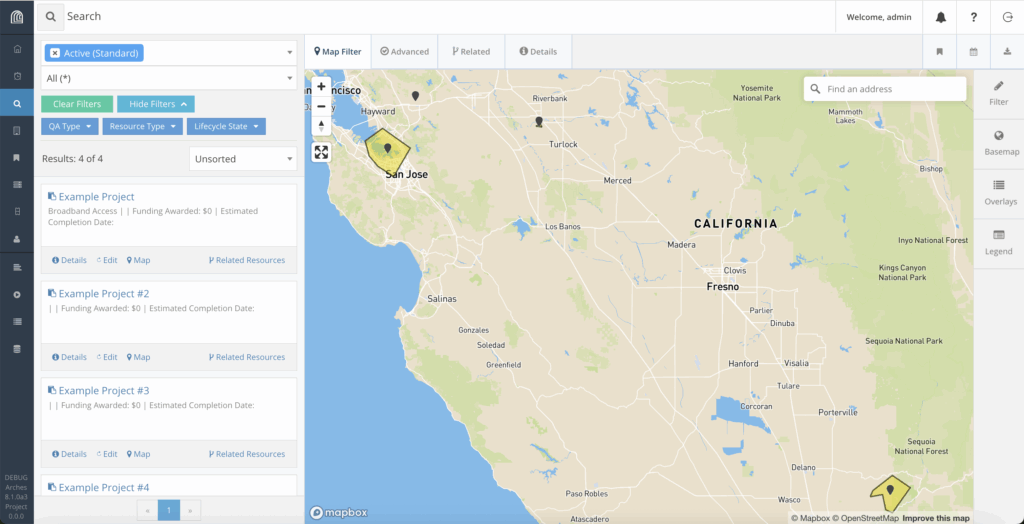
As Farallon senior developer Rob Gaston describes it, lifecycles act as a bridge to a more intuitive experience: “If I’m an application developer, I can consider different instances differently based on that state. If a resource is in a draft state, maybe I don’t show it, or maybe I show it differently. So, it’s a flag that you can use as an application developer to define behavior in your application interfaces based on those states.” In practice, this means developers can design interfaces that expose only clean, validated data to end users, while still allowing draft work to happen behind the scenes. Retired data can be hidden or displayed differently, providing projects with more flexibility in managing long-term stewardship.
However, lifecycles extend beyond just filtering. Each transition between states is accompanied by an event hook, allowing developers to attach functions that execute business logic whenever a resource advances to its next state. In our earlier example, this function could send a notification to the lease manager, alerting them to a new draft request for a lease that has been submitted and requires their attention. As part of the review, a manager can ensure that the tenant has an acceptable credit history and, if so, decide to approve the lease application, moving the request from a draft state to an “active” state.
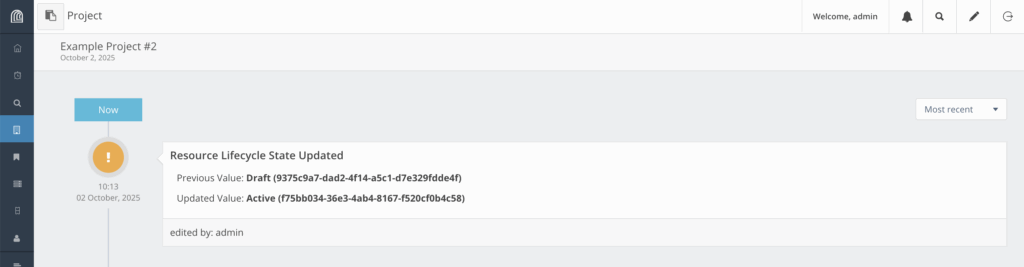
These functions open the door for all sorts of useful automation. Rob identifies another common occurrence in the instance of minting a unique identifier, such as a Digital Object Identifier (DOI). DOIs are immutable identifiers created by an external provider, which may incur a fee for each DOI registered. With event hooks, an external API call is attached to the transition from the draft state to the active state, allowing administrators to prevent excess spending on incomplete resource instances while ensuring relevant data is officially referenceable.
The possibilities don’t stop here—whether state transition trigger notifications or data validation functions, the Farallon team is excited to enable application development that allows for more customization and powerful functionality than ever before! Currently, v8 doesn’t ship with functions that utilize these event hooks out of the box, so we’d love to see what the community has to say and what people build and share!
The Road Ahead
Resource instance lifecycles reinforce the broader goals of version 8, which emphasize flexibility and extensibility for application developers. They bring structure to how resources move through different states — from draft to published to retired — and they open up powerful new opportunities for developers to shape application behavior toward richer workflows, smarter integrations, and more nuanced control over your data.
The takeaway is simple: if you’re an Arches developer, now’s the time to experiment with lifecycles. Define your own states, build your own rules, and see how they can streamline your workflows. The future of Arches is one where data doesn’t just exist — it lives through a lifecycle.
Photo Credit: Joshua Doubleu on flickr. No changes made.